Remove Background from image free — How It Works and Why You Need It
You’ve got a perfect product photo, a great headshot, or a clean logo — and then there’s that cluttered background ruining everything. We’ve all been there. You just need the subject, nothing else, and somehow that feels like it should take five seconds but ends up eating your entire afternoon.
The old way meant opening Photoshop, fighting with the pen tool, zooming in on stray pixels, and still ending up with edges that look like they were cut with safety scissors. Not anymore. The ability to remove background from image free — instantly, without any software — has genuinely changed how people work with images. Whether you’re a freelancer, a student, a small business owner, or just someone who needs a clean profile picture, this matters to you.
Why Background Removal Used to Be Such a Pain
The core problem was always the same: backgrounds are complicated. Hair strands, transparent objects, fur, soft shadows — these things don’t have clean edges. Traditional tools required manual selection, layer masks, and a level of patience most of us simply don’t have on a Tuesday afternoon.
Professional designers spent years learning these techniques. And honestly, even they’d admit the process was tedious. You’d spend twenty minutes on one image, export it, realize the edges looked wrong, and start over.
Then came AI-powered background removal. The technology behind modern tools uses deep learning models trained on millions of images. They’ve learned to identify foreground subjects — people, products, animals, logos — and separate them from the background with remarkable accuracy. The model doesn’t just look at color differences. It understands context. It knows that a person’s hair is still part of the foreground even when individual strands are semi-transparent against a bright sky.
The result? What used to take twenty minutes now takes under ten seconds. And the quality, for most use cases, is genuinely impressive. Fine hair, detailed product edges, complex shapes — modern AI handles these far better than most people expect the first time they try it.
This is exactly why tools like the Background Remover on Toolifycore have become so popular. No account needed. No subscription. No waiting. Just upload and done.
How to Remove a Background — Step by Step
- Go to the tool. Head over to the Background Remover. You don’t need to create an account or enter your email. Just open the page.
- Upload your image. Click the upload area or drag and drop your file. JPG and PNG both work well. For best results, use an image where the subject is reasonably clear — good lighting always helps the AI do its job faster.
- Let the AI process it. This usually takes just a few seconds. The model analyzes your image, identifies the subject, and removes everything behind it. You’ll see the result almost immediately.
- Preview and check the edges. Look at the fine details — hair, sleeves, product edges. In most cases the result is clean. If anything looks slightly off, try re-uploading with a slightly higher resolution version of the original.
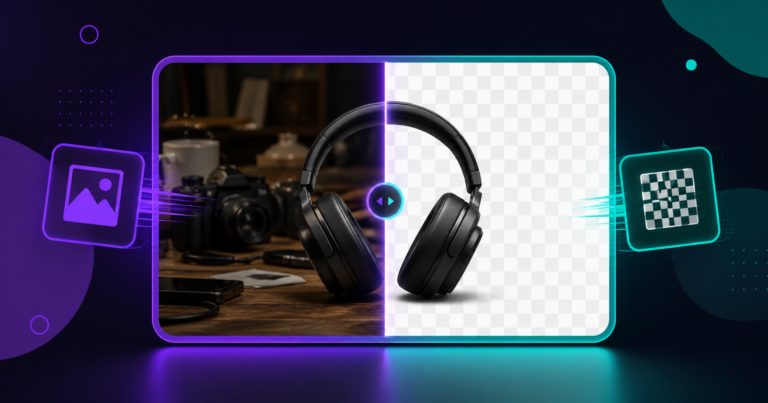
- Download your transparent PNG. Your image comes out as a PNG with a transparent background, ready to drop onto any new background, website, presentation, or design file.
Real Situations Where This Actually Saves You
Let’s talk specific examples because vague use cases don’t really help anyone.
A freelance graphic designer on Fiverr processes around 30 product images per week for e-commerce clients. Before using an AI tool, that was easily 4–5 hours of Photoshop work. Now? Under an hour, mostly review and minor touch-ups. That’s roughly 15 billable hours saved per month.
In Pakistan, a common scenario involves NADRA-related document photos or university portal submissions. These platforms often require plain white or specific colored backgrounds for passport-sized photos. Instead of going to a photo studio and paying Rs. 200–400 per visit, you can take a decent photo at home, remove background from image free, and place a clean white or blue background behind it yourself. Done in two minutes.
For small business owners running Instagram or Daraz stores, clean product photos against white backgrounds increase click-through rates noticeably. Some sellers report conversion improvements of 15–25% just from cleaner product visuals — that’s not a small number when you’re running on thin margins.
My genuine tip: always start with the highest resolution image you have. AI tools perform significantly better with detail-rich images. A 3MB photo will give you far cleaner edges than a compressed 200KB version.
Once you have your clean transparent PNG, you might also want to resize it for a specific platform. The Image Resizer handles that instantly. And if your file size is too large for upload limits, run it through the Image Compressor to bring it down without visible quality loss.
Is It Safe to Upload Your Images?
This is a fair question and one more people should ask. When you upload an image to any online tool, you’re trusting that platform with your file. The Toolifycore Background Remover processes images without storing them permanently. Your file is used for the removal process and that’s it — it’s not saved to a database, not shared, not used for training without consent.
That said, as a general rule: don’t upload images containing sensitive personal documents or private information to any third-party tool unless you’ve read and understood their privacy policy. For standard photos — products, headshots, logos — you’re completely fine.
Frequently Asked Questions
Does removing a background from an image free tool work on complex images like hair?
Yes, modern AI handles hair surprisingly well. It’s not perfect in every case — very fine flyaway strands against similarly-colored backgrounds can sometimes get clipped — but for most real-world images, the result is clean and usable without any manual editing.
What format does the processed image download in?
You’ll get a PNG file with a transparent background. PNG is the correct format for this because it supports transparency, unlike JPG. If you need a different format after, you can convert it easily.
Can I use this tool to remove background from image free for commercial work?
Yes. If you own or have the rights to the original image, the processed version is yours to use commercially — for client work, product listings, marketing materials, whatever you need.
Try It Right Now — No Signup, No Cost
If you’ve been putting off cleaning up your images because the process always felt like too much effort, this is the moment to stop waiting. The Background Remover at Toolifycore is free, fast, and requires nothing from you except the image itself. Upload it, download the result, and get back to actually doing the work you care about. It really is that simple.